Debian is often chosen for its stability and for a system that just works. However, that stability often means that packages can become out of date. Moving to the unstable branch might be an option.
Debian Unstable will provide you with newer packages, but there are inherent risks of breakages, since the packages have not been fully tested. If you do move to Unstable, it's probably best not to do it on a critical machine where you need guaranteed stability. With that said, the steps to move from Debian Stable to Unstable:
Using an editor such as nano, micro or vim open the Apt Sources file. Apt downloads packages from one or more software repositories (sources) and installs them onto your computer.
sudo micro /etc/apt/sources.list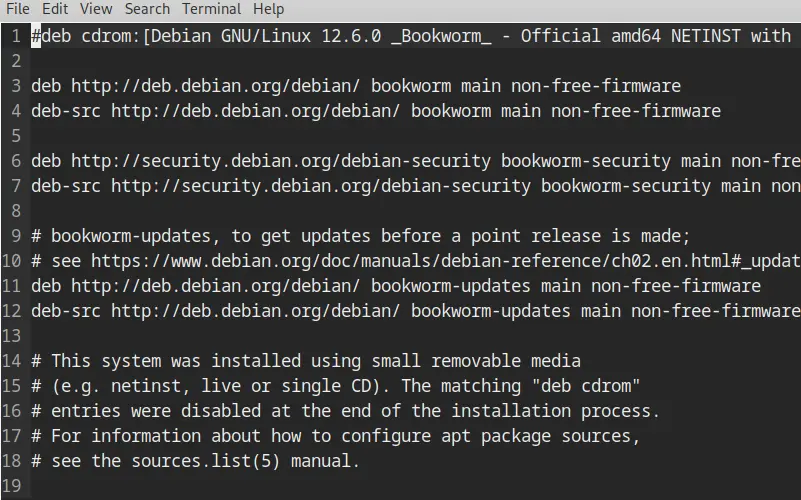
In the
sources.listthere needs to be only two entries (see screenshot below):deb http://deb.debian.org/debian/ unstable main non-free-firmware deb-src http://deb.debian.org/debian/ unstable main non-free-firmwareThe other entries/sources can be commented out using the
#at the beginning of the line. This will stop them from running. You can also delete the unneeded sources if desired.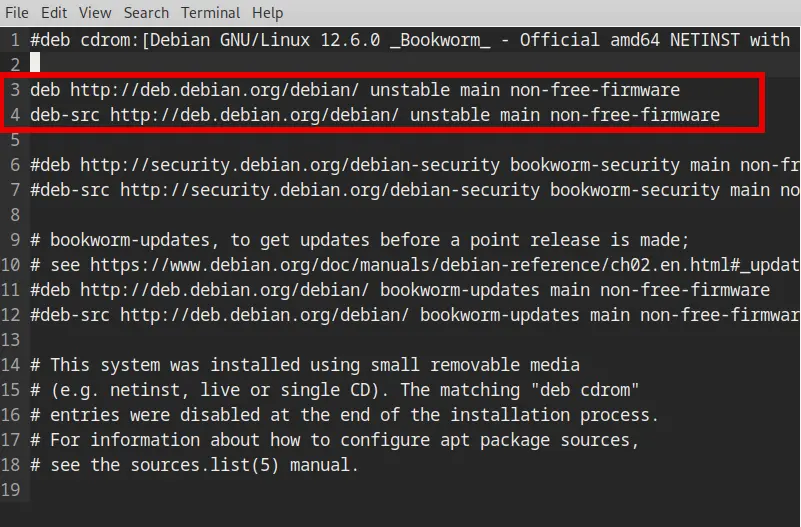
Next, to update the sources list run
sudo apt update && sudo apt full-upgradeThis may take some time.
Avoiding bugs
In order to make your life easier in the Unstable version, install the apt-listbugs and apt-listchanges packages so that you are notified of grave bugs or important changes when you install new packages or during an upgrade. 1
sudo apt update && sudo apt install apt-listbugs apt-listchanges
Sources: